








Angel BossKey for Windows
- Free
- 4.7
- 5
- V3.1.0
Free Download for Windows
View an ad to download for free

- AngelSoft
- More programs (4)
AngelBossKey fast hides game & browser windows via custom hotkeys for Windows
Angel BossKey is a lightweight, professional window hiding utility exclusively built for all Windows systems. Delivered as a single standalone executable file, the program contains no bundled plugins, adware or extra junk files, offering a clean, secure running experience for both 32-bit and 64-bit Windows versions from Windows XP up to Windows 11.
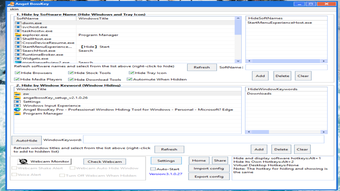
Centered around fully customizable global hotkeys, this desktop tool lets you set independent shortcut combinations for three core operations: hiding selected application windows, hiding Angel BossKey itself, and switching virtual desktops. All hotkeys work in toggle mode: one press hides all target windows & tray icons, another press instantly restores everything back to normal.
The software supports abundant flexible hiding rules to fit all usage scenarios:
- Create title keyword filters to auto-hide any window containing specified text in its title bar
- Lock designated software processes to conceal all windows belonging to the target program
- Built-in preset hiding templates for mainstream instant messengers including Telegram and ICQ, one-click to batch hide chat windows
Beyond regular program windows, Angel BossKey can hide system tray icons for any application. It also features automatic system audio muting while hiding windows, stopping audio playback from games, videos and web pages so sound won’t accidentally expose you.
Rich auxiliary functions greatly extend its practicality:
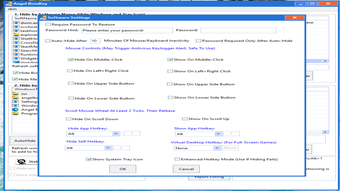
Idle Auto-Hide monitors your mouse and keyboard activity. If no input is detected for your customized waiting time, the tool will automatically trigger the hiding sequence without manual operation.
The exclusive virtual desktop module is specially optimized for full-screen large game windows that cannot be hidden via conventional window hiding methods, perfectly solving hiding failures caused by game anti-cheat protection.
### Core Function List
1. Hide windows by window title keywords: Auto-conceal all windows with matched title text
2. Hide windows by program process: Block all windows belonging to selected software
3. Category-based one-click hiding: Predefined groups for chat apps (Telegram, ICQ etc.)
4. Supports hiding game & browser windows, all system tray icons; automatically mutes system audio during hiding
5. Fully customizable global hotkeys; enhanced hotkey mode to eliminate shortcut conflicts
6. Idle automatic hiding: Trigger hiding when your PC stays unattended
7. Virtual desktop feature: Reliably hide large full-screen game windows
8. Allow renaming the program executable arbitrarily; no feature limitations, no forced homepage modification
9. System-wide compatibility & system startup option: Windows XP / 7 / 8 / 10 / 11 (32bit & 64bit)
10. Camera trigger auto-hide: Activate hiding automatically when the camera detects someone approaching, accompanied by voice alerts and window shaking reminders
11. Auto-block persistent pop-up ad windows via custom keyword rules
### Usage Tips for Game Hiding
To hide games smoothly:
1. Turn on Enhanced Hotkeys and click Refresh Window List to add all game processes to your hidden list;
2. Alternatively, use the virtual desktop mode for game hiding.
Recommended operation order: Launch your game first, then run Angel BossKey and refresh the window list to capture all game-related processes. Many games spawn multiple sub-windows after startup; you must add all associated EXE files to the hidden list, otherwise hiding will fail partially or entirely.
If window hiding does not work properly: Right-click Angel BossKey and choose **Run as administrator**.
### Global Hotkey Introduction
Three independent customizable toggle hotkeys:
1. Hotkey to hide selected applications
2. Hotkey to hide Angel BossKey itself
3. Hotkey to switch virtual desktops
Each hotkey uses toggle logic: Press once to hide targets, press again to restore all hidden windows and tray icons.
Loading…
-1920-1980.png)
App specs
Developer
- AngelSoft
- More programs (4)
License
Free
Version
3.1.0
Latest update
Platform
Windows
OS
Windows 11
Language
English
Downloads
5
Last month's downloads
- 5
Size
8.61 MB
Program available in other languages
Angel BossKey for PC
- Free
- 4.7
- 5
- V3.1.0
Free Download for PC
View an ad to download for free
User reviews about Angel BossKey
Have you tried Angel BossKey? Be the first to leave your opinion!
Add reviewTop downloads Keyboards for Windows
Top downloads Keyboards for Windows
Top downloads Keyboards for Windows
Related topics about Angel BossKey
Latest articles

Nintendo issues new GitHub takedowns: 400-plus Switch emulator repos removed

Bayek returns in Watcher of Realms: not in new Origins DLC

Game of Thrones: The Promised Prince is now available, revisiting a major Song of Ice and Fire prophecy
Call of Duty: Modern Warfare 4 returns to Nintendo on Switch 2: early tests raise concerns

Silo season 3 is now on Apple TV+: it’s No. 1 in 101 countries
Laws concerning the use of this software vary from country to country. We do not encourage or condone the use of this program if it is in violation of these laws. Softonic may receive a referral fee if you click or buy any of the products featured here.